
GrabUrPass AI
GrabUrPass AI builds and changes your form from a plain-English description. You watch the board update as it works. Use it to get a first draft fast, or to make changes without clicking through settings.
If you don't see this, it isn't available on your account yet.
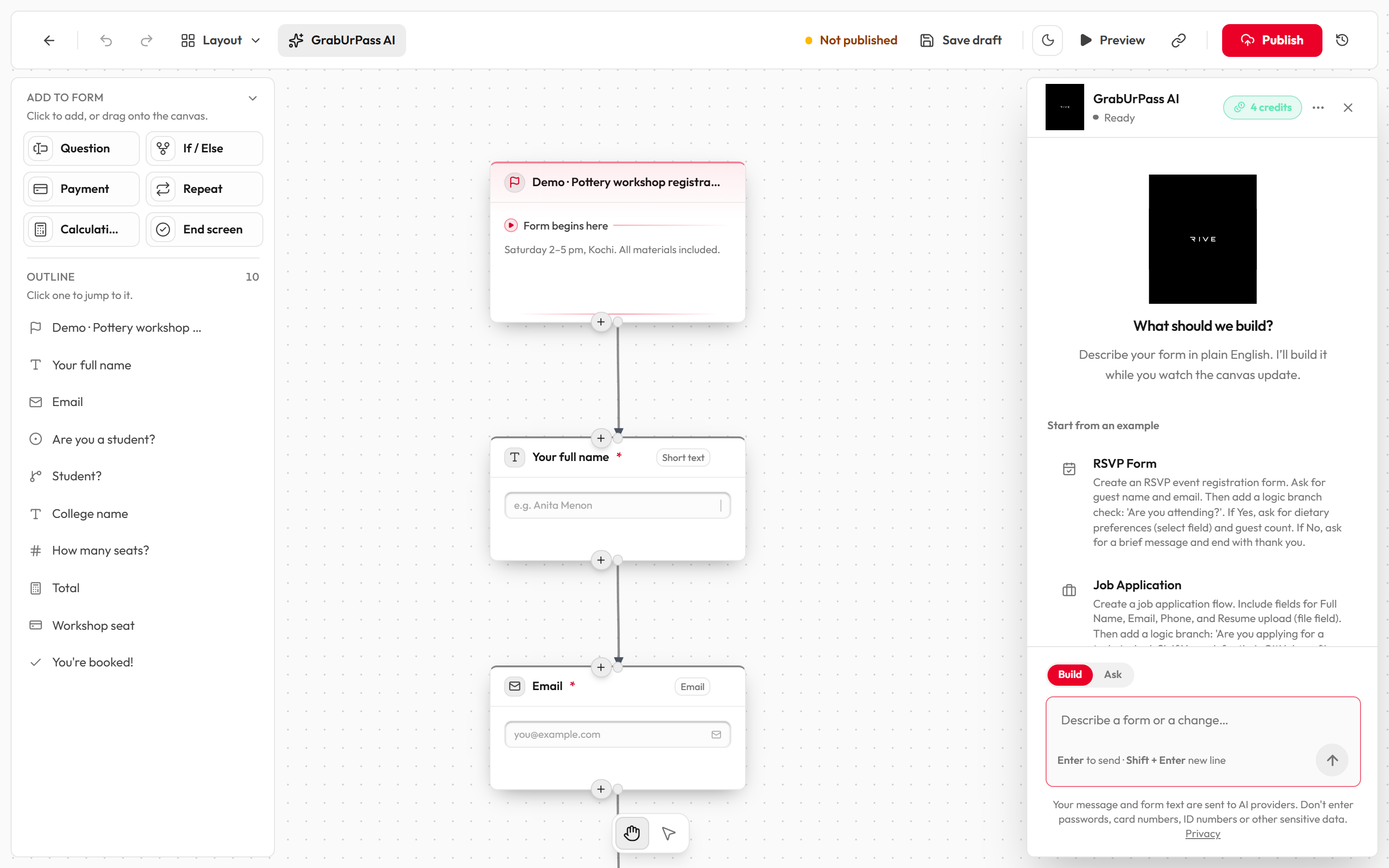
Build a form with AI
- Open a form in the editor, or click Generate with AI on the Forms page.
- Click GrabUrPass AI in the header. The chat panel opens.
- Make sure the mode is Build.
- Describe what you want, or pick an example under Start from an example.
- Press
Enterto send. PressShift+Enterfor a new line. - Watch the blocks appear. New blocks glow and carry a "GrabUrPass AI" tag. A cursor shows what it is building.
- Keep chatting to change it, for example "Make the email required".
After a build, the AI tidies the layout. If it leaves a broken connection, it tries one automatic repair for free. Click Follow AI to bring the view back after you have moved around.
Build vs Ask
| Mode | What it does | Cost |
|---|---|---|
| Build | Changes your board: adds, edits and connects blocks. | 1 credit per message |
| Ask | Answers questions about your form. Never changes the board. | ¼ credit per message |
Building by hand is always free.
Example forms
On the welcome screen, click one to send it straight away.
- RSVP Form
- Job Application
- Premium Course Signup (only if payments are on for your account)
- Product Feedback loop
After your first message, quick chips appear: Add a question, Add branching, Add payment (only if payments are on) and Make required. They only fill in the text box. You still press send.
Credits
The credits badge in the panel header shows what you have left. It turns a warning colour when you have 3 or fewer. Click it to add more.
| Setting | What it does | Options / default |
|---|---|---|
| Free credits | Topped up to 5 at the start of each month. Unused ones expire at month end. | 5 a month |
| Builder and Pro | Topped up to 100 a month. | 100 a month |
| Starter credit pack | A one-time pack of 25 credits, valid for 30 days. | ₹25 |
| Failed messages | If a message fails or returns nothing, the credit is refunded. | Automatic |
| Hourly limit | If you send too many messages in an hour you see "You have reached the hourly GrabUrPass AI limit." | Wait and try later |
When you run out, a dialog says "You're out of AI credits". Manual building still works. See Plans and AI credits.
If you don't see credits, they are not available on your account yet. AI is then free for everyone who has it.
Panel options
| Setting | What it does | Options / default |
|---|---|---|
| Auto-fix errors | Lets the AI retry its own mistakes. | On or Off |
| Technical details | Shows extra detail in the chat. | On or Off |
| Clear chat | Empties the conversation. Your form is not touched. | Shown once there is a chat |
| Fix for me | A button in a yellow banner when your board has errors. The AI tries to fix them. | Uses 1 credit |
Tips for good prompts
- Say what the form is for and who fills it in: "An RSVP for a school annual day."
- List the questions you need and which are required.
- Say how the form should branch: "If they say no, skip to the thank-you screen."
- Ask for one change at a time once the form exists.
- Name the question you mean. "Make the email question required" works better than "make it required".
- Keep each message under 4,000 characters.
- Use Ask when you want an explanation and not a change.
What it can't do
- It only edits the board. You publish the form yourself.
- It always sets payments in rupees (INR), whatever you ask for.
- It limits a Repeat block to 30 passes.
- It can make mistakes. Review what it builds and use Preview before you share.